Home > Fix Optimized 3MLE for ArcheAge MML
Convert MIDI to MML
Simply select your *.mid file (from your computer) and click on the button. IMPORTANT: Make sure your MIDI file name is all letters only with .mid as the file extension!
The app will automatically find the first 5 tracks in your MIDI file and convert each track to its own MML sheet music. Just click the copy button and then open your blank music sheet inside the game and paste the MML code into the field. Here’s an original piano composition by XayberOptix in MIDI format you can try out: Download Mythology Romance MIDI file.
[Click to open this app in its own window].
What is this?
This is a utility to properly convert MIDI notes into MML code for use in ArcheRage Private Server.
Who is this for?
This is for anyone with a desire to bring MIDI notes directly into the game as MML code inside of ArcheRage Private Server.
Why use this?
If you’ve been in the Artistry scene on ArcheRage Private Server (or even ArcheAge Live Server), you know that creating music to be performed in the game comes with some challenges. One of the top challenges is to fit as many musical notes into a sheet of music paper as one possibly can. If not properly optimized, one can be left with MML code that takes up more characters than the music paper can support. In the old days, Bards struggled to perform complete songs because it was tough to fit all of the notes into one sheet of music even when using the highest-tiered music paper let alone step through the entire procedure of getting MIDI to MML using programs like 3MLE. If you don’t like the pain of going through this tedious process, then you should use this app.
Where is the problem (doing it the old way)?
After writing your music using a MIDI sequencing program like Reaper (https://reaper.fm) and exporting it to a .mid file, you would typically import it into 3MLE (http://3ml.jp/download.html) in order to convert your MIDI notes into MML. In the process of converting your MIDI notes to MML when you get to the part where you want to export the MML, you will be asked whether you’d like to “optimize” the exported MML.
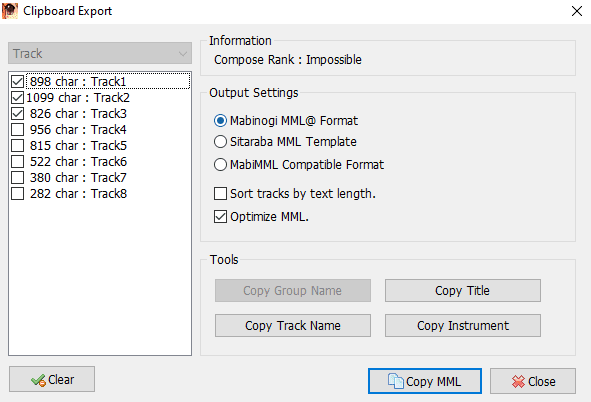
If you choose not to optimize, then your MML code will oftentimes take up more characters than is necessary. This would be fine if your music doesn’t take up more characters than your music paper can handle. The problem presents itself when a piece of music contains notes that equate to using more characters than even your highest-tiered music paper can handle. Typically, when you check the “Optimize MML” box, it will lessen the number of characters required to play the same music; however, the optimized 3MLE code doesn’t play well in ArcheRage (or ArcheAge). This is when this utility proves handy.
We’ve taken out the pain!
The app will automagically find up to the first 5 MIDI tracks in your MIDI file and output it/them as MML code for each track. It will tell you how many characters each sheet is and how many MML tracks it used.
Keep in mind that if the MIDI notes in your MIDI file is not neatly aligned to to a 64th note grid, it may sound a bit unexpected or possibly take up more characters.
Key Freatures:
If you choose to have it use sustain, then it will automatically recognize the “hold note” info recorded in your MIDI file to make your notes sound like you are stepping on the sustain pedal on the piano. It will automagically create a tempo track if your MIDI file has Tempo info in it. If you don’t need tempo changes in the MML code, then you can choose to specify a steady tempo for the entire piece.
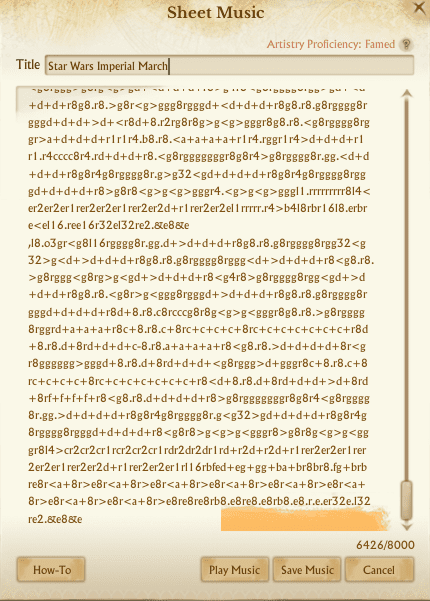
How does it work?
This app does several things behind the scene (so that you don’t have to):
- Adjusts the notes to the correct octave range
- Fixes “n” notes by assigning the correct note
- Fixes volumes by changing them to correct values
- Puts each track on its own line
- Removes the unnecessary “MML@” from the code
- Creates a Tempo Track with “tempo” changes
- Sustains Notes properly with “hold note” info
Special thanks
We would like to recognize Torvin for inspiring us in creating optimal MML code by coming up with his original Python code that fixed optimized MML from 3MLE. Please check out Torvin’s GitHub at: https://github.com/kernighan/archeage-3mle